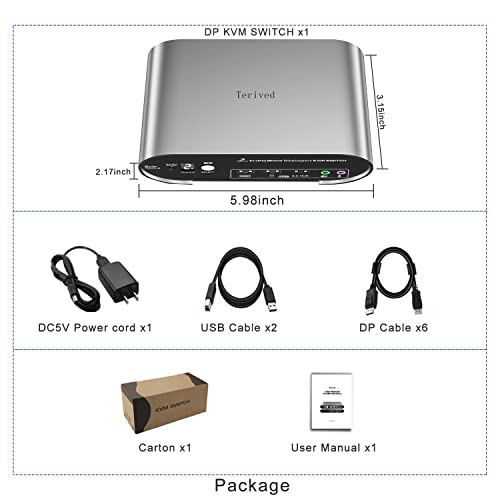
2 Computers 3 DP Monitors KVM Switch with Hotkey and Automatic Switching, 4K@144H USB 3.0 Triple Monitor with Audio Microphone, Aluminum, Digital Display HDR10 All Cables Included - style: 2 Computers 3 DP Monitors USB 3.0
About this item
- Attention: Please use our provided cables for all computers and monitors to achieve the best result. Make sure to plug in all the cables. The two USB cables are for the front KVM USB ports. If you don't connect them to your computers and KVM switch, your keyboard, mouse, and USB 3.0 hub will not function.
- Attention: This DP Triple monitor KVM switch requires 3 DP output ports form each computer. Please check how many external monitors are supported by your computer or laptop before you buy. For adaptors, we only suggest HDMI to DP cables or Type-C to DP cable if you need more DP ports from your computers
- Aluminum Alloy shell - We want to give customers the best quality; we use aluminum alloy for the body, which provides you with an excellent premium look, great drop resistance, light-weight, strong, and robust corrosion resistance
- Digital Display- KVM Switch 2 port with a digital display which lets you easy to see the current channel even in the dark investment
- Hotkey - Tired of a manual button switch? This product gives you a convenient way to switch with keyboard hotkeys switch
- Two Computers three DP Monitors KVM Switcher - Controls 2 Displayport interfaced computers or other applicable devices using one keyboard, a mouse, three DP monitors with audio & microphone, and USB 3.0 HUB for data transferring rate up to 5Gbps/s (10 times faster than USB 2.0)
- Displayport KVM Switch up to 8K - Supported resolutions: 480i, 480p, 720p, 1080i, 1080p, 2K@144Hz, 4K@144Hz, 8K@30Hz RGB 4:4:4 HDR10.Auto-Scan, auto-detection Hot plug & play and HDCP. Multi-platform: support Windows 11/10/7/2000/XP/Vista, Linux, and Mac
- KVM switch with Automatic Switching: To enable the automatic switching feature of the KVM switch, press Right [CTRL] twice, then [S], and [Enter]. The default auto-switching time is 10 seconds. (To turn it off, simply press this shortcut combination again). You can adjust the auto-switching time by pressing Right [CTRL] twice, followed by [S], then [N], and [Enter], where 'N' represents the number of seconds for the switching time (ranging from 1 to 999 seconds).
Overview
- Operation Mode: Automatic
- Current Rating: 1 A
- Operating Voltage: 5 volts_of_direct_current
- Contact Type: Normally Open
- Connector Type: Displayport, USB, Plug In
- Brand: Terived
- Switch Type: Push Button
- Terminal: Physical
- Material: Aluminum, Metal
- Mounting Type: Plug In Mount
Couldn't load pickup availability
Low stock: 10 left
View full details

Reviews
-
⭐⭐⭐⭐⭐
Olivia Bennett — Seattle, Washington
Listenora has a practical selection of audio accessories that made it easy to find what I needed. The product information was clear, ordering was simple, and everything fit naturally into my everyday listening setup.
-
⭐⭐⭐⭐⭐
Ethan Parker — Austin, Texas
I liked how easy it was to browse the different audio categories. The accessories I ordered were straightforward to use and helped make my desk setup feel cleaner, more organized, and more convenient.
-
⭐⭐⭐⭐⭐
Samantha Reed — Denver, Colorado
The item arrived as expected and worked well with my setup. I especially appreciated the clear product details, which helped me check the connection type and compatibility before placing my order.
-
⭐⭐⭐⭐⭐
Michael Turner — Portland, Oregon
Listenora offers useful audio products without making the shopping process feel complicated. My order was easy to track, the accessories were neatly packaged, and I would consider shopping here again for future audio needs.
FAQ
What types of products does Listenora sell?
Listenora offers everyday audio accessories for work, gaming, travel, fitness, and personal listening. Our selection includes headphones, earbuds, microphones, speakers, audio cables, adapters, stands, protective cases, replacement parts, and cleaning accessories.
How can I check whether a product is compatible with my device?
Please review the connector type, supported devices, dimensions, operating-system requirements, and compatibility information shown on the product page. For additional assistance, contact us with the exact brand and model number of your device before ordering.
How much does shipping cost?
Unless a different rate or promotion is displayed during checkout, we charge a flat shipping fee of $6.90 per order. International duties, taxes, customs charges, and other third-party fees are not included unless expressly stated.
How long does order processing take?
Orders are generally processed within 1–3 business days after payment is confirmed. Processing may take up to 5 business days during holidays, promotional events, high-demand periods, or inventory reviews.
How long will delivery take?
Estimated delivery is generally 5–10 business days within the United States and 10–20 business days for eligible international destinations after shipment. Delivery times are estimates and may be affected by carriers, customs, weather, address issues, or other circumstances.
How can I track my order?
Once your order has shipped, tracking information will generally be sent to the email address used during checkout. Tracking may take 2–5 business days after dispatch to display its first meaningful update.
Can I change or cancel my order?
Please contact us as soon as possible after placing your order. We will make reasonable efforts to assist, but changes or cancellations cannot be guaranteed once processing, fulfillment, or shipment has started.
What is your return policy?
Eligible unused products may generally be returned within 30 days after confirmed delivery. Products must meet our return conditions and receive authorization before being shipped back. Certain opened or used hygiene-sensitive audio products may not qualify for change-of-mind returns.
What should I do if my item arrives damaged, defective, or incorrect?
Contact us promptly with your order number, a description of the issue, and clear photographs or videos of the product, packaging, and shipping label. Please retain all original packaging and accessories until the issue has been reviewed.
How can I contact Listenora customer support?
Email us at gtrefasnhuim@gmail.com. Please include your full name, order number, and a clear description of your question. Most inquiries are reviewed within 1–3 business days.
Made for Everyday Listening
At Listenora, we believe audio accessories should do more than simply connect a device. They should make everyday listening feel easier, more comfortable, and better organized.
Every routine has different audio needs. Some moments call for clear communication during work or gaming, while others require compact, dependable accessories for travel, exercise, or relaxed listening. That is why Listenora focuses on practical audio products designed to support real everyday situations without making your setup feel complicated.
Our collection is selected with usability in mind — from headphones, earbuds, microphones, and speakers to cables, adapters, stands, protective cases, replacement parts, and cleaning accessories. Each product is chosen to help improve comfort, connectivity, organization, and convenience across a wide range of audio setups.
Listenora is made for people who value useful products, simple connections, and a more enjoyable listening experience. Whether you are preparing for a meeting, settling into a gaming session, heading out for a workout, or organizing your audio equipment, we are here to help make everyday sound work better for you.
Blog posts
View all-
Memory Foam vs. Silicone Ear Tips: Which Is Bet...
Discover whether memory foam or silicone ear tips provide better noise isolation for busy offices. Learn how fit, comfort, and ear tip material affect ANC performance and everyday listening.
Memory Foam vs. Silicone Ear Tips: Which Is Bet...
Discover whether memory foam or silicone ear tips provide better noise isolation for busy offices. Learn how fit, comfort, and ear tip material affect ANC performance and everyday listening.
-
How to Stop Wireless Earbuds From Falling Out D...
Keep your wireless earbuds secure during every workout by choosing the right ear tips. Learn how size, material, and proper fitting techniques improve comfort, stability, and sound quality for fitness...
How to Stop Wireless Earbuds From Falling Out D...
Keep your wireless earbuds secure during every workout by choosing the right ear tips. Learn how size, material, and proper fitting techniques improve comfort, stability, and sound quality for fitness...
-
Top 5 Mistakes People Make When Choosing Ear Ti...
Discover the five most common ear tip mistakes that reduce comfort, sound quality, and noise isolation. Learn how choosing the right size and material can dramatically improve your listening experience...
Top 5 Mistakes People Make When Choosing Ear Ti...
Discover the five most common ear tip mistakes that reduce comfort, sound quality, and noise isolation. Learn how choosing the right size and material can dramatically improve your listening experience...